
A study with the chair’s back to the door
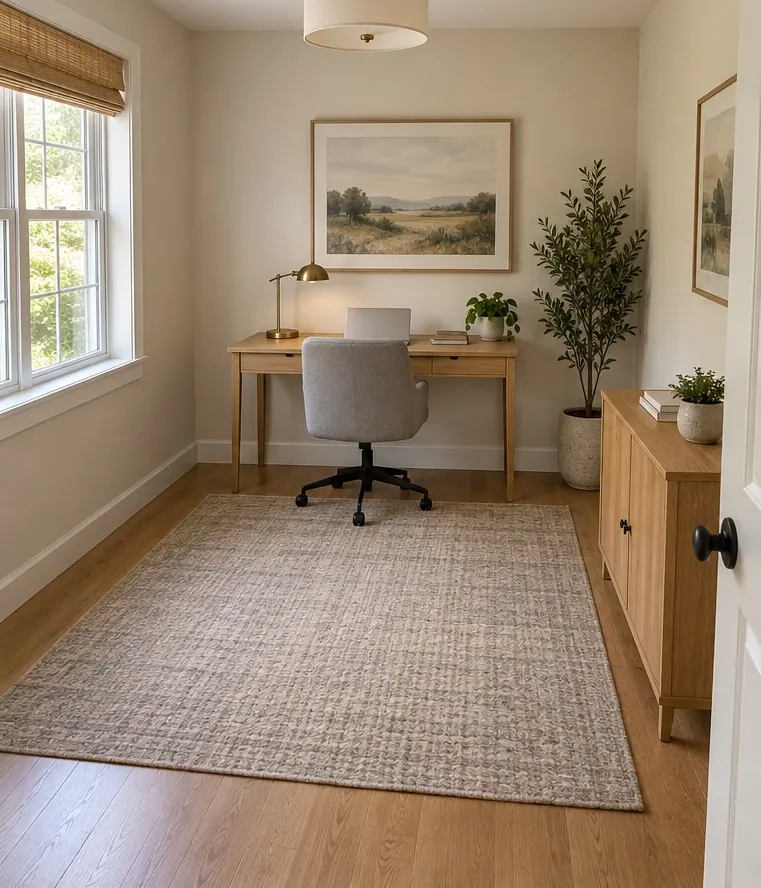 Before
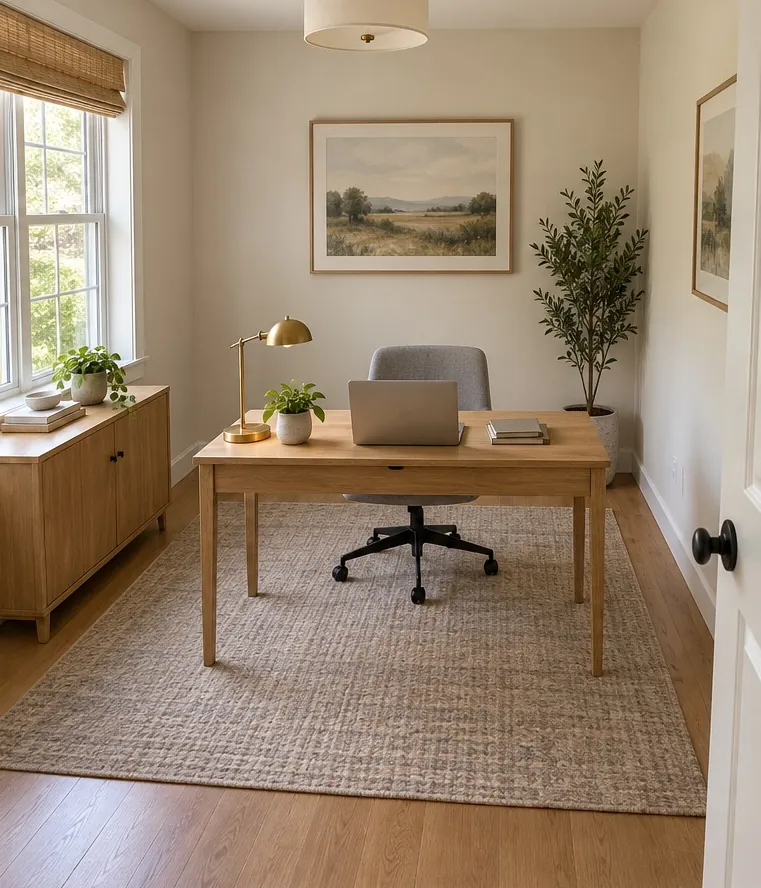 After
Rule: Command position
Before. The desk is on the far wall and the cabinet beside the door, so you work with your back to it.
After. The desk comes into the room with the chair backed by the wall, and the cabinet moves under the window.
Setting up your room
The sample room is 3.6 by 4.2 metres, drawn to scale from above. Turn your own room in your head until it matches, then set it up in this order.
- Door is on the. Pick the wall your door is in. "Near wall" is the bottom edge of the drawing.
- Door position. Pick the third of that wall the door sits in.
- Desk is by the. Pick the wall the desk stands against, or would stand against.
- You sit. "Facing the wall" is a desk pushed against the wall with you looking at it. "Back to the wall" puts your chair between the wall and the desk, so you look into the room.
The dashed line runs from your chair to the door. It turns green when the door is in view and you are off its line.
Reading the result
The verdict sits above three ticks or crosses, one per test.
- In the command position. All three pass.
- Partly in command. You can see the door and you are off its line, but there is open room behind you. Almost every desk facing a wall that has the door in it lands here.
- Out of the command position. Either the door is behind you or you sit straight in its line. Those two are treated as the serious failures.
"In front of you" means anywhere ahead of the line through your shoulders, so a door level with your elbow, a little forward, counts as seen. "In line" means the door is within 15 degrees of straight ahead, the same tolerance the app uses.
Two notes can appear underneath. "The desk crowds the doorway" means the desk or chair stands where the door swings or where you walk in. "Show a position in command" moves the desk to the first wall spot that passes all three tests with this door. The reasons behind each test, and how much a desk facing a wall really matters, are on desk facing a wall.
Worked results for three rooms
These are the checker’s own answers, set up as described.
A spare room with the door in a corner. Door on the near wall, left.
| Desk and seat | Result |
|---|---|
| Against the far wall, facing it | Out: the door is behind you |
| Back to the far wall, middle or right | In the command position |
| Back to the far wall, left | Out: straight in the door’s line |
| Back to the right wall, any position | In the command position |
| Against the near wall, right, facing it | Partly in command |
The corner door is the easiest case. Most of the room passes once you turn round.
A bedroom off a hallway, door in the middle of a long wall. Door on the left wall, middle.
| Desk and seat | Result |
|---|---|
| Back to the right wall, middle | Out: straight across from the door |
| Back to the right wall, far end or near end | In the command position |
| Back to the far wall, middle or right | In the command position |
| Against the left wall, either end, facing it | Partly in command |
Here the obvious spot, opposite the door, is the one that fails. Sliding the same desk to either end of the wall fixes it.
A narrow room with the door centred on a short wall. Door on the near wall, middle.
| Desk and seat | Result |
|---|---|
| Back to the far wall, middle | Out: straight in the door’s line |
| Back to the far wall, left or right | In the command position |
| Back to a side wall, far end or middle | In the command position |
| Back to a side wall, near end | Passes, but the desk crowds the doorway |
| Against the near wall beside the door, facing it | Partly in command |
What the checker leaves out
It knows one door, four walls and a desk 140 cm wide. It does not know your window, your radiator, a second door, a wardrobe that takes a wall, or the bed if the desk shares a bedroom. It ignores compass direction, which belongs to personal directions from BaZi and Eight Mansions. Your room is not 3.6 by 4.2 metres, and a few centimetres decide whether a seat is in line with a door, so treat a result near a boundary as a prompt to check by eye.
Light, storage, the view behind you on a video call and desks in shared rooms are covered in the home office guide. The bed placement tool runs the same three tests for a bed.
Misreading the result
- Treating "partly in command" as a fail — it means the door is in view and only the backing is missing. Most practitioners rate that a minor compromise, and a high-backed chair is the usual answer.
- Setting the door on the wrong wall — the walls are named from the drawing, not from where you stand. Turn your room until the door matches before you choose.
- Moving to the suggested spot without checking the window — the checker has no windows. If the passing spot puts a window behind your chair, it is weaker support than the result shows.
- Chasing a green line into the door’s swing — if the crowding note appears, the position fails in practice whatever the ticks say.
What a scan checks that the checker cannot
- Where your desk really stands. The app tries a seat on each long side of the desk and reports the better one.
- Whether a wall is within about a metre behind that seat.
- Whether you can see, and are in line with, the nearest door of the room you scanned.
- Sharp corners of shelves or cabinets aimed at your desk.
- A desk out of the command position is raised as a finding; a desk that is only partly in command is labelled on the plan but not listed as a problem.
- With your BaZi chart and a compass heading, the direction you face when you sit.
- Not read: whether the wall behind you has a window in it, or a mirror you have set up to show the door.
Questions
Why does my desk show "partly in command"?
You can see the door and you are off its line, but nothing solid is behind your chair. That is the usual result for a desk facing a wall with the door to one side. Turning the desk to put your back to a wall is the full fix; a high-backed chair is the partial one.
What counts as being in line with the door?
The checker counts you as in line when the door is within 15 degrees of straight ahead from your chair. Sliding the desk along the wall by a desk's width usually clears it.
My room is not 3.6 by 4.2 metres. Is the result still useful?
Yes for the pattern, less so for a borderline seat. Which wall and which third of it the door is in decides most results. Near the 15-degree edge, your own measurements decide.
Does the checker consider compass direction?
No. It tests position relative to the door and walls, which is what form school asks. Compass direction is a separate method that depends on the person.
Sources and further reading
- Ole Bruun, An Introduction to Feng Shui, Cambridge University Press, 2008
- Michael Paton, Five Classics of Fengshui: Chinese Spiritual Geography in Historical and Environmental Perspective, Brill, 2013
Works on the tradition this page summarises. They are further reading, not endorsements of the app. How the app applies the rules: how Feng Shui AR reads a home.
A sample room shows the principle. It cannot tell you whether, from your own chair, the door of your own room is in view or straight ahead.
SCAN YOUR OFFICE
The checker uses a sample room. A scan checks your desk where it really stands.
On the App Store and Google Play · iPhone, iPad and Android